Tabular Nutrition Facts Label
You may use it when the tallest open space for the panel is under about 3 inches, so a vertical panel does not fit.
On the package
- 2.5 in
- Tallest open space
- About 3 in
- What a vertical panel needs
- Tabular
- Allowed here
Why this format
A 4 oz bar of chocolate. The back of the wrapper is 6 in wide and only 2.5 in tall, about 30 sq in front and back. A vertical panel does not fit on either face, and a tabular panel does, so the tabular panel is allowed.
§ 101.9(d)(11)(iii)An invented product, for illustration.
The label, part by part
Hover or tap a part.Tap a part.
Nutrition
Facts
About 4 servings per container
Serving size
3 pieces (30g)
Calories
per serving160
Vitamin D 0mcg 0% • Calcium 20mg 2% • Iron 3.5mg 20% • Potassium 220mg 4%
*The % Daily Value (DV) tells you how much a nutrient in a serving of food contributes to a daily diet. 2,000 calories a day is used for general nutrition advice.
Scroll the label sideways.
A 4 oz bar of dark chocolate. Invented values, rounded the FDA way.
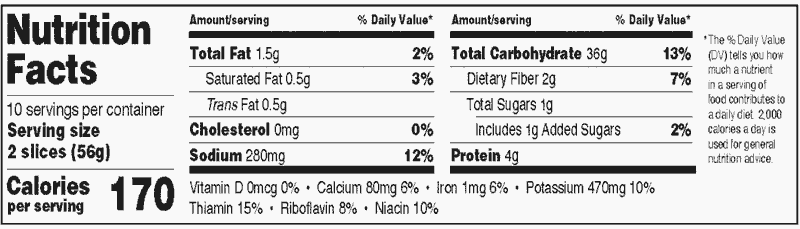
FDA’s sample
Whole panel
Rules for the panel as a whole: space and bold type.
Wide and short. It fits under about 3 in of height.
“Nutrition Facts”, “Serving size”, “Amount per serving”, “% Daily Value*”, the names of nutrients that are not indented and the %DV figures. The calorie number and the serving size line are bold too. Servings per container is not.
Total Sugars 7g
Total Sugars 7g
In words
Wide and short. It fits under about 3 in of height.
Bold. “Nutrition Facts”, “Serving size”, “Amount per serving”, “% Daily Value*”, the names of nutrients that are not indented and the %DV figures. The calorie number and the serving size line are bold too. Servings per container is not. § 101.9(d)(1)(iv)§ 101.9(d)(1)(iii)§ 101.9(d)(3)(ii)
- “Nutrition Facts” heading Need not run the full width of the panel
- About 3.5 pt
Serving
How many servings the package holds, and how big one is.
Moves left § 101.9(d)(11)(iii) From FDA’s sample
- 10 pt
- 9 pt, bold Standard vertical: 10 pt, bold
- 10 pt, bold Standard vertical: 16 pt, bold
- 22 pt, bold
Nutrients
Fat, cholesterol, sodium, carbohydrate and protein, with the %DV where there is one.
Two columns § 101.9(d)(11)(iii) From FDA’s sample
- 8 pt
- Nutrient column heading “Amount/serving”
- 6 pt
Vitamins and minerals
Vitamin D, calcium, iron and potassium, plus any others you list.
One line § 101.9(d)(11)(iii) From FDA’s sample
- 8 pt
Footnote
The note at the bottom that says what %DV means.
Its own column § 101.9(d)(11)(iii) From FDA’s sample
- 6 pt
?
Rule text
From FDA’s sample
BetterMenu’s choice
Do I need this?
These pages are for conventional foods and drinks, not dietary supplements or medical foods.
Studio works out the per-serving and per-package numbers from your recipe today. It exports the standard vertical panel. Tabular export is not available yet. Studio gives the per-serving and per-package numbers, and your designer sets them in the tabular layout. Open Studio
In detail
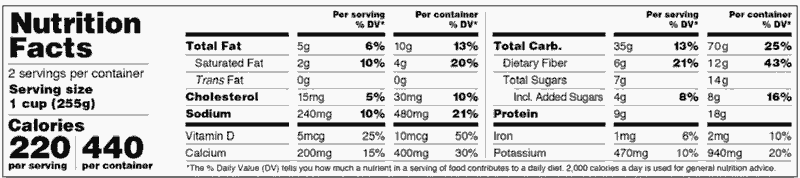
Tabular dual column
When a package needs a per-package or per-unit column and only a tabular panel fits, the tabular panel carries both columns.
FDA shows this in its own sample label.
§ 101.9(e)(6)§ 101.9(e)(6)(ii) When a dual column is requiredHow to measure your package
- Find the tallest open space for the panel: one unbroken area, measured top to bottom. § 101.9(d)(11)(iii)
- Under about 3 in, a tabular panel is allowed. About 3 in or more, use a vertical panel. § 101.9(d)(11)(iii)
- The 3 in is the height a vertical panel needs from its heading down to the potassium line. § 101.9(d)(11)(iii)
Example. A chocolate bar wrapper is 6 in wide and its back panel is 2.5 in tall. 2.5 in is under about 3 in, so a vertical panel does not fit and the tabular panel is allowed.
Common mistakes
-
Wrong: Using tabular when a vertical panel fits.
Right: With about 3 in of height, use the vertical panel.
§ 101.9(d)(11)(iii) -
Wrong: On a package over 40 sq in, using the small-package short names on a regular tabular panel.
Right: Keep full names above 40 sq in.
§ 101.9(j)(13)(ii)(B) -
Wrong: Dropping the second column on a package that needs a dual column.
Right: Use the tabular dual column.
§ 101.9(e)(6)(ii)
Rule text and sources
“If there is not sufficient continuous vertical space (i.e., approximately 3 in) to accommodate the required components of the nutrition label up to and including the mandatory declaration of potassium, the nutrition label may be presented in a tabular display as shown in the following sample label.”
“The following sample label illustrates the provisions of paragraphs (b)(2)(i)(D) and (b)(12)(i) of this section for labels that use the tabular display.”
- The rule: FDA, 21 CFR 101.9, eCFR as of 2026-02-12
- FDA sample label, Tabular format: 88 FR 17710
- FDA sample label, Tabular dual column: 83 FR 65493
- The same facts as data: Tabular as JSON
- Paragraphs cited on this page § 101.9(d)(11)(iii)§ 101.9(e)(6)§ 101.9(e)(6)(ii)§ 101.9(j)(13)(ii)(A)(1)§ 101.9(j)(13)(ii)(B)§ 101.9(d)(1)(iii)§ 101.9(d)(3)(ii)§ 101.9(d)(3)(i)
Related formats
Questions
When can I use a tabular Nutrition Facts label?
When there is not enough continuous vertical space for the panel, about 3 inches, up to and including potassium.
Is tabular the same as the small-package tabular label?
No. The small-package tabular label is for packages under 12 square inches, or up to 40 square inches when no vertical or tabular panel fits on any side. Any panel on a package that size may use every short name on FDA’s list, such as “Sat fat”. On a package over 40 sq in, a regular tabular panel may use only “Total carb.” and “Incl.”, and only as a tabular dual column.
Can a tabular label have two columns?
Yes. A package that needs a per-package or per-unit column can show both columns in a tabular panel.
What is the minimum font size for a tabular label?
Nutrient rows 8 pt, “Calories” 10 pt and its number 22 pt, the serving size line 9 pt, and servings per container 10 pt.
Every label format, and which one you need
For information only. Check the sources before printing a label.