Skip to content

Every save is a version. Trace every label.

Compare any two versions, restore one, and trace a printed label back to its version.
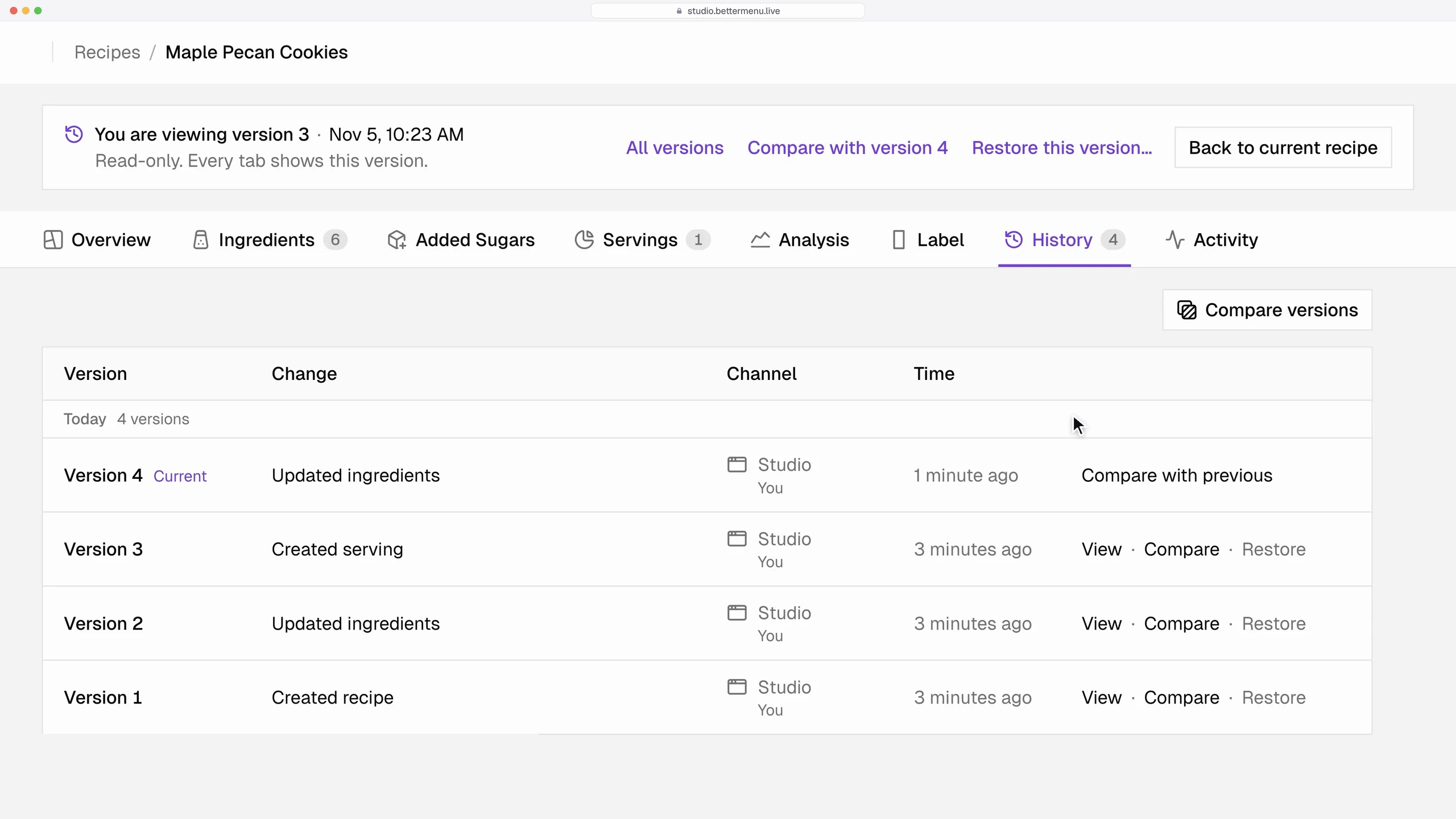
An earlier version of a sample recipe, read-only, with compare and restore

What does a recipe’s history look like?

One line per save, with when and where it was made. The label printed on Nov 5 names version 4, so it still opens after later changes.

  1. Version 1

    Recipe created

    Oct 20 · Studio

  2. Version 2

    Maple syrup changed from 1/4 to 1/3 cup

    Oct 22 · Assistant

  3. Version 3

    Serving set to 30g

    Oct 30 · Studio

  4. Version 4

    Added sugars confirmed, label exported

    Nov 5 · Studio

    On the printed label

  5. Version 5 · current

    Pecans swapped for walnuts

    Nov 5 · Assistant

Can I compare two versions side by side?

Yes. Pick any two versions and see what changed, ingredient by ingredient. Earlier versions never change.

Sample: Honey almond granola (sample), Version 1 and Version 2 compared per serving after honey: 3 tbsp to 4 tbspHoney: 3 tbsp to 4 tbsp. Calories: 250 in Version 1, 240 in Version 2. Sodium: 180mg in Version 1, 170mg in Version 2. Added Sugars: 8g (15%) in Version 1, 10g (20%) in Version 2.v1v2Honey 3 → 4 tbspCalories250240Sodium180mg170mgAdded Sugars8g10g
Studio, real UI: a sample recipe’s versions, two of them compared line by line

How does a printed label lead back to its recipe?

Its proof footer names the recipe version and links to it in Studio, so a label on a shelf points to its exact recipe.

A printed label, the proof footer under it, and the recipe version in Studio that the footer namesA printed Nutrition Facts label for a sample recipe, Maple Pecan Cookies. Under the panel, outside its box, the proof footer. It names the recipe, the recipe ID and version 4 with a link to that version in Studio, when the file was made, and the rule version used. The link leads to version 4 in the recipe’s version history, marked Printed: the exact version the label was made from.VersionsStudiov5Version 5Nov 5v4Version 4Printedv3Version 3Oct 30v2Version 2Oct 22Nutrition FactsServing size30gCalories120Total Fat 5g6%Sodium 35mg2%Total Carb. 17g6%Total Sugars 11gProtein 3gProof footerMaple Pecan Cookiesrcp_7Q2M, version 4Made Nov 5, 2026, rules 18.0.0A printed label, the proof footer under it, and the recipe version in Studio that the footer namesA printed Nutrition Facts label for a sample recipe, Maple Pecan Cookies. Under the panel, outside its box, the proof footer. It names the recipe, the recipe ID and version 4 with a link to that version in Studio, when the file was made, and the rule version used. The link leads to version 4 in the recipe’s version history, marked Printed: the exact version the label was made from.VersionsStudiov5Version 5Nov 5v4Version 4Printedv3Version 3Oct 30v2Version 2Oct 22Nutrition FactsServing size30gCalories120Total Fat 5g6%Sodium 35mg2%Total Carb. 17g6%Total Sugars 11gProtein 3gPrinted labelProof footerMaple Pecan Cookiesrcp_7Q2M, version 4Made Nov 5, 2026, rules 18.0.0
a printed label, its proof footer, the recipe version it names

Questions

More questions

Who changed what, and when?

The activity log lists every change to a recipe or custom ingredient, when it was made, and whether it came from Studio or an assistant.

Can I go back to an earlier version?

Yes. Restore any version and it becomes current. The versions in between stay in the history.

Make your first label today.

No card needed. See pricing.